
Ensuring that tasks are correctly categorized and assigned to the right individuals is crucial for effectively monitoring the progress of a vehicle.
Creating A Task
You can create a task by clicking on the + icon within a step: 
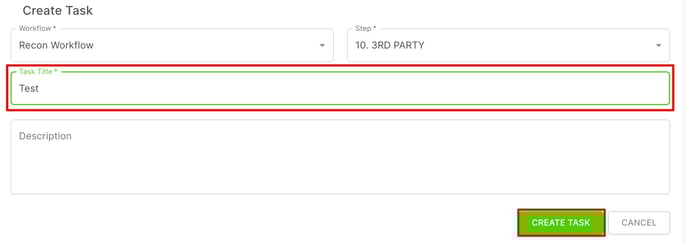
A pop-up will appear where you'll need to add a Task Title (Description is optional). Then you can click on the Create Task button to finish creating the task.
 Task Status
You can assign/change the status of a task by clicking on the Status Button:
When setting the statuses on the task for your users, please reference "Step/Task Categories and Statuses" Placing the task in the right status will help everyone know what work is currently being done and what work still needs to be addressed.
Task Assignment
To assign a user as the owner of a specific task, click on the User Icon:
Be sure to click on the User Icon for the task and not the User Icon for the step.

Ensuring that your tasks are assigned will assure your users can address the work they need in a timely manner, as it will make it appear on their "My Work" tab.