On the main page, you can see a quick outline of where you are priced.
Once you enter the details you will be able to see in-depth information.
Carfax Four Pillars
To access this feature you must have a Carfax account to log into. Once you log in your team will have access to the sections as well. 
Market Comps
The market comps compares all pricing configurations on the same trim level. Clicking the price will display additional vehicle information and the source of the comp. 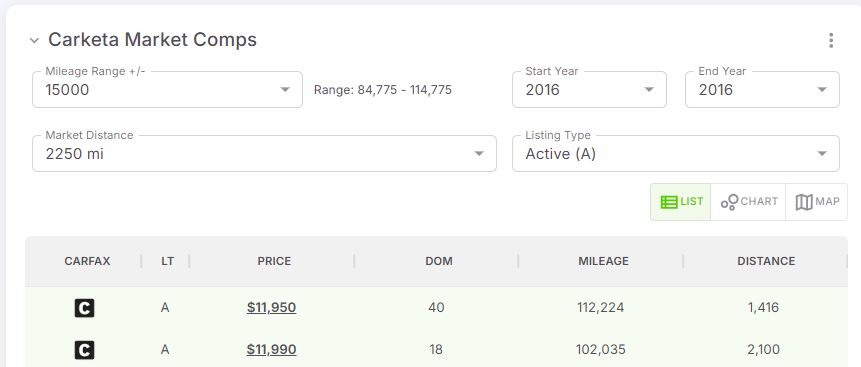
Vehicle Pricing Logic
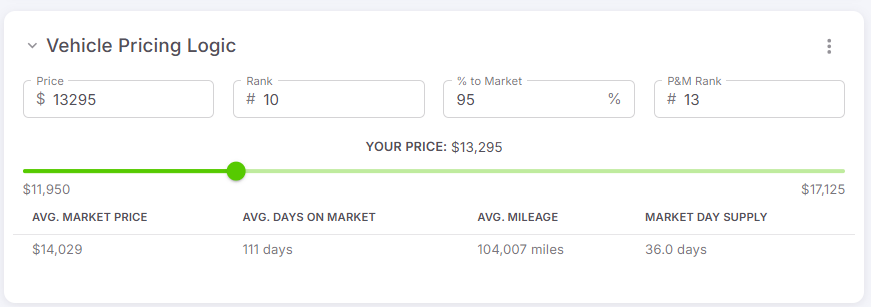
By adjusting your either Price, Rank, Market or P&M (Price & Mileage) % will give you a quick adjustment of the others. This will help you determine what is the best price in your current market.
Book Values
You need to have book values enabled in order to see these in your account
Book values will show you the current vehicle value according to the book you're using. We currently integrate with the following three book values:



National asking Price history
This graph will let you know if your vehicle is trending up or down in the current market 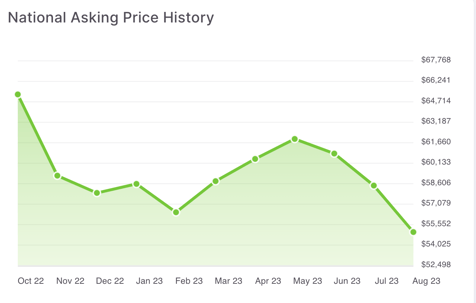
Live local market
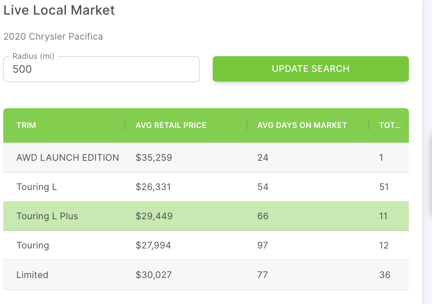
The table compares all trim levels with the average price they are retailing for and how long they are taking to sale on the market. Helping you know if your vehicle has been sitting for too long and if you are priced correctly.