What are the sections of the inventory view?
There are four main sections on the inventory view Recon, Inspection, Repair Order, and Comments. There are 4 main clickable items the Current Recon Step, Inspection, Comments, and Repair Orders.
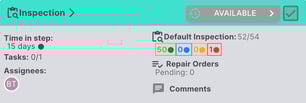
The current step will be displayed on the top banner.

The time that the vehicle has been on the current step will be displayed in days and the color can be adjusted on the recon template.

People assigned to the current step.

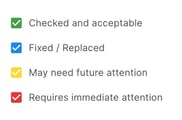
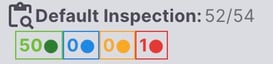
Default inspection total steps with how may have been marked in each status.
Number of repair orders on the vehicle that are pending.

Comments on the recon workflow when clicked will open a pop-up window with the comments for easy access.